It always starts with a deceptively simple ticket in the backlog: “Add a basic chat room so users can talk to each other.”
If you are a capable engineer, your brain immediately starts mapping out the solution. A couple of Node.js or Laravel instances, a Redis adapter to broadcast events, some standard WebSockets, and a basic messages table in your database. You estimate it’ll take a week or two. You write your first connection string, a message goes from User A to User B in your local environment, and you feel like a wizard.
But there is a massive difference between a chat application that works on localhost and a production-grade custom messaging infrastructure.
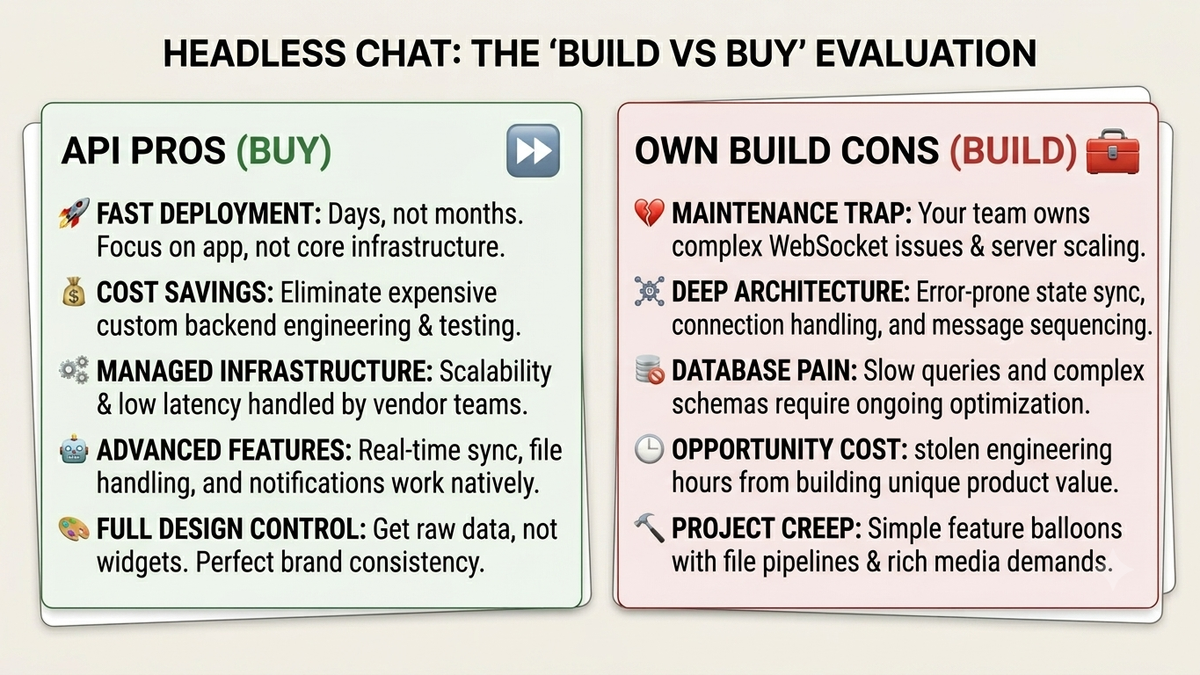
When you decide to build a real-time chat backend from scratch, you aren’t just writing code for sending text strings. You are signing up for a hidden lifetime tax of infrastructure maintenance, edge-case debugging, and scaling nightmares.
1. The Nightmare of WebSocket Connection Drops
On localhost, your connection is perfect. In the real world, your users are riding in elevators, walking through subway tunnels, switching from Wi-Fi to 5G, and putting their phones into low-power mode.
When a network drop occurs, WebSockets don't always close cleanly. They hang. If your server doesn't realize a user has disconnected, it keeps trying to push data into a dead pipe. To fix this, your team has to build complex heartbeat mechanisms (ping/pong frames).
2. A Chat Database Schema is a Trap
A naive chat database schema looks simple: id, sender_id, recipient_id, text, created_at. But users expect modern messaging features. Within a month of launching, your product manager will ask for group chats, read receipts, typing indicators, threads, and file attachments.
{
  "channelId": "uuid-v4",
  "message": {
    "id": "msg-8923",
    "type": "text",
    "content": "Hey team, did the server just drop?",
    "status": "delivered"
  }
}
Querying this data efficiently is notoriously difficult. If a user scrolls up to load their chat history, you have to execute heavy pagination queries over millions of rows while joining user profiles, attachment metadata, and read statuses. If your database takes more than 100 milliseconds to return those messages, your chat feels sluggish, and your user experience is ruined.
3. Handling Race Conditions in Chat
When thousands of users are messaging concurrently, distributed systems layout a minefield of race conditions. Handling race conditions in chat will keep your senior engineers awake at night.
If your backend doesn't utilize a strict global sequencing mechanism (like Lamport timestamps or highly synchronized cluster clocks), users will see completely different conversation histories on their screens. Messages will appear out of order, context will be broken, and debugging it across a distributed server cluster is incredibly frustrating.
Own Your Frontend. Delegate Your Backend.
Choosing a headless chat API isn't about compromising on your product vision. In fact, it's the exact opposite. Because a headless API provides raw data via webhooks and clean JSON payloads without forcing a generic, ugly UI widget onto your application, you retain 100% control over your user experience.
You still get to build the beautiful, bespoke frontend components, the pixel-perfect chat bubbles, and the unique custom user actions in your favorite frontend framework. But underneath that beautiful frontend, you get a bulletproof, infinitely scalable real-time engine that just works.

Team Flash Chat
Product & Engineering